Table of Contents
- Classroom Data at Your Fingertips
- Encouraging Super Spellers
- Shared Learning Checks = Common Assessments
- Nominate a Pathways Learning User
- Register for a Webinar This Winter
- Need help with Pathways Learning?
Classroom Data at Your Fingertips
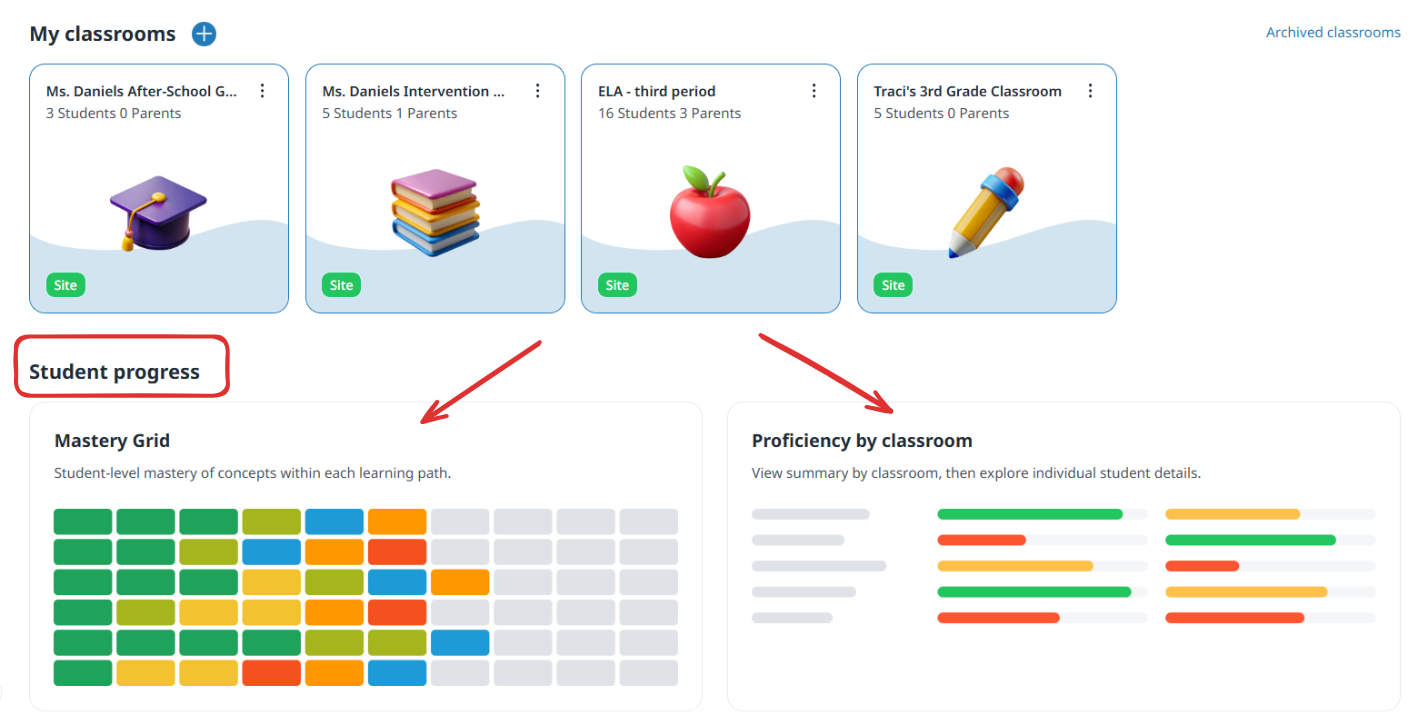
The first marking period is now behind us, and your students have been working hard to reach their goals. You may be wondering: what is the best way to view their progress? While student reports remain accessible within individual classrooms, we are excited to introduce a more efficient way to track performance: the improved Mastery Grid. You can now access this comprehensive roll-up of data directly from your classroom dashboard, providing you with a clear, centralized view of how every student is performing across their learning paths. Check out the two new views which are now available under "Student Progress."
- The Mastery Grid - this provides a comprehensive view of student progress, conceptual trends, intervention needs, and proficiency levels. Select the classroom, one or more students, and specific concepts, then your intervention task is ready to be assigned!
- Proficiency by Classroom - this provides an overview of how each classroom is performing and is great for comparison purposes.
- Learning Stats - Coming very soon! This will be a rollup of problems solved, spelling words practiced and more!
Encouraging Super Spellers
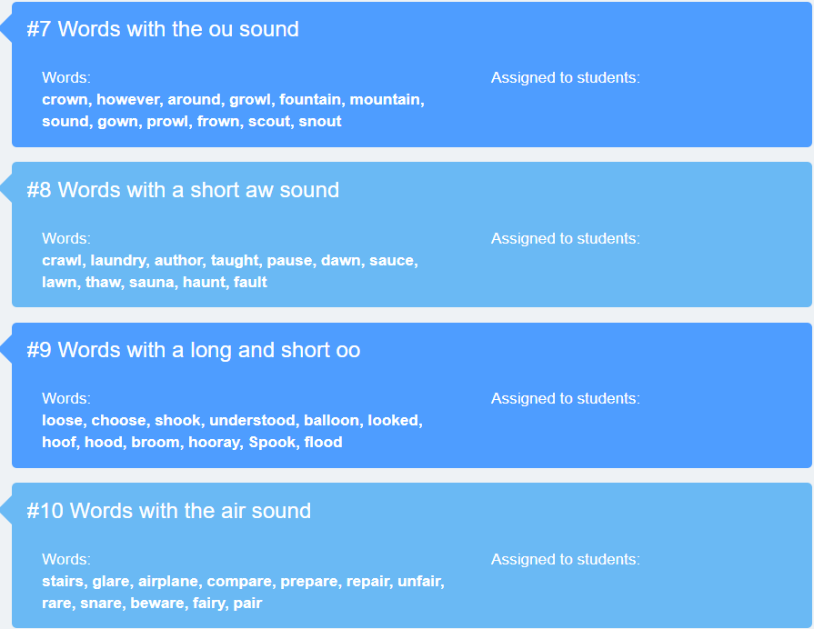
Did you have the opportunity to attend our recent Spelling webinar? It was a great session designed to help educators master the various Spelling features within Pathways Learning. To give you a better idea of the impact, here are three key takeaways shared by our community:
- "I can create my own word lists aligned to specific units I am in. Game changer!"
- "Pathways Learning has spelling lists ready for me to assign in my grade level? On it!"
- "The spelling games are a cool way to help my kiddos and they work with my words too!"
In a nutshell, Pathways Learning has 40 lists for each grade level (K-8) that can be assigned individually. There are also grade-level paths which contains all lists for that level. Learn more about how to use Spelling by watching the recorded webinar.
Shared Learning Checks = Common Assessments
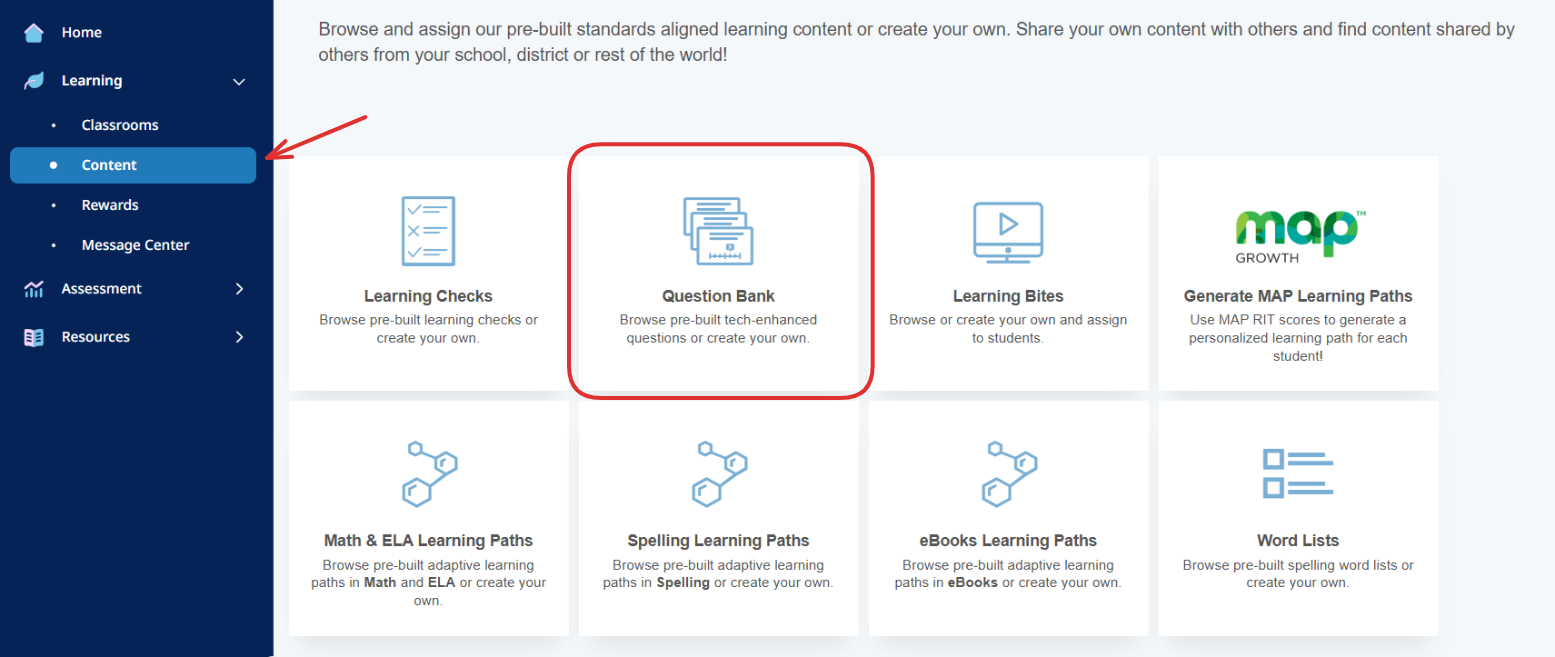
Following feedback from our recent professional development sessions, we know that many educators are eager to learn more about creating common assessments. If you are ready to start collaborating with your colleagues, navigate to the Content Library. There, you can access our robust question bank to design your first "Learning Check." Please note that these questions differ from those students encounter during standard practice, and you can easily filter items by DOK level and item type to suit your needs.
Check out the short video on Learning Checks and get going!
Register for the webinar and see this LIVE on Wednesday, November 4th.
Nominate a Pathways Learning User
Our first round of user awards will be announced in our January newsletter. This is your opportunity to nominate a user for one of the categories listed below. Our educators are doing incredible work, and we want to celebrate the outstanding contributions happening across the Pathways Learning community. To nominate a user, complete this form.
Category #1: Standards Mastery
This category highlights teachers who go above and beyond with Learning Paths and Content (Math, ELA, Learning Bites, Learning Checks, Writing, Spelling).
- Bite-Sized Brilliance - They are the master of all things Learning Bites.
- Word Wizard - They are a Spelling aficionado!
- Path Pioneer - They enjoy the art of Learning Path customization!
- Writing Wonder - They use Writing as a motivational tool!
- Quiz Master - They navigate Learning Checks as an integral part of the learning journey!
Category #2: Student Engagement
This category highlights teachers who encourage students to achieve their goals and are rock stars with the class wall or rewards!
- Habit Hero - Their goal is helping students achieve their goal and it shows!
- Motivation Maestro - They have the best rewards!
Category #3: Targeted Intervention
This category highlights teachers who use creative assignments and paths to target specific standards for intervention when their students need it the most.
- Tier Titan - Their specialty is creating short paths targeting IEPs and small groups.
- Intervention Ace - Their assignments are almost daily and are super targeted for the class, small groups or individuals.
NEW Category #4: Unmatched Support
This category highlights users who go above and beyond to help others utilize Pathways Learning.
- Support Sommelier - Their specialty is helping others navigate the platform and discover useful features.
- Feature Whisperer - They can be counted on to showcase the right feature in a meeting!
Register for a Webinar This Winter
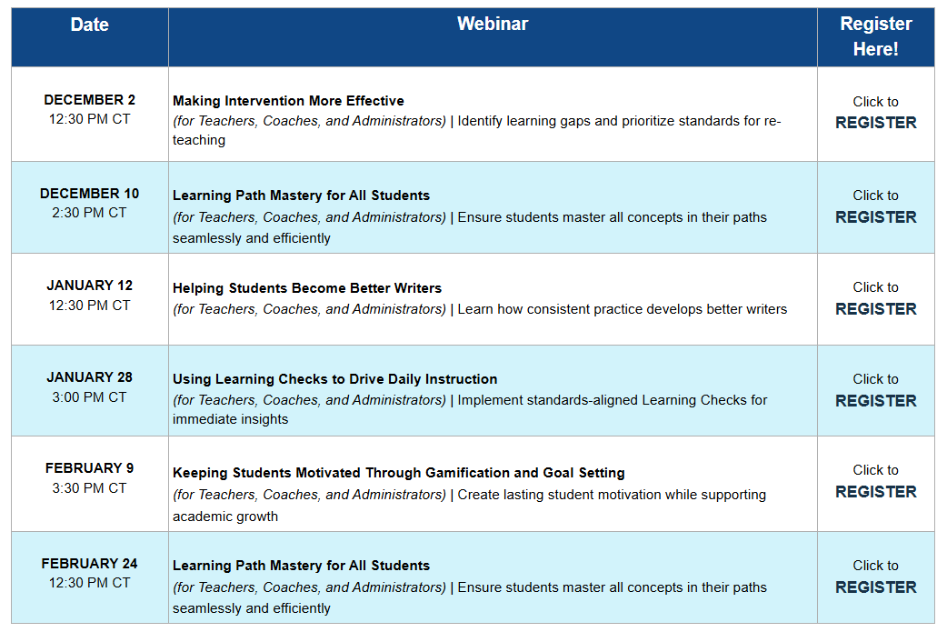
Our fall webinars have been very successful and we will be continuing the momentum with our winter series. Check out the schedule where you can plan ahead and register. All registrants will receive the recording!
Need help with Pathways Learning?
When you need help, we want you to get assistance as soon as possible.
- Click the question mark in the upper right hand corner and send us a message from within your admin or teacher account.
- Send us an email directly to support-pathways@learningexplorer.com.
- Schedule a 10-minute support call with us! Book it here.

Was this newsletter helpful? Let us know by selecting the happy face! If not, reply and tell us what we can do better to serve you!
Was this article helpful?
That’s Great!
Thank you for your feedback
Sorry! We couldn't be helpful
Thank you for your feedback
Feedback sent
We appreciate your effort and will try to fix the article